> For the complete documentation index, see [llms.txt](https://docs.rampwin.com/llms.txt). Markdown versions of documentation pages are available by appending `.md` to page URLs; this page is available as [Markdown](https://docs.rampwin.com/english/working-hours.md).

# Working Hours

To define the office hours and holidays of your business, you can utilise the Working Hours setting of [My Account](broken://pages/H0qFFMusJTKPeBnpfXqi).

<figure><img src="https://files.gitbook.com/v0/b/gitbook-x-prod.appspot.com/o/spaces%2FhElFPtMZjXYjDDMBT5q2%2Fuploads%2FCkAb2cd5TPfseVs9SAny%2FEditing%20Working%20Hours.png?alt=media&#x26;token=d3a038fd-1462-4f4a-b4e9-e5f2132bb0b7" alt=""><figcaption></figcaption></figure>

Simply click the Edit <img src="https://files.gitbook.com/v0/b/gitbook-x-prod.appspot.com/o/spaces%2FhElFPtMZjXYjDDMBT5q2%2Fuploads%2FfzLY7Idmr3hiOiJSCDsE%2FEdit%20Button.png?alt=media&#x26;token=977d3256-385b-48d6-b57b-1a23ff0c5ce8" alt="" data-size="line">icon.

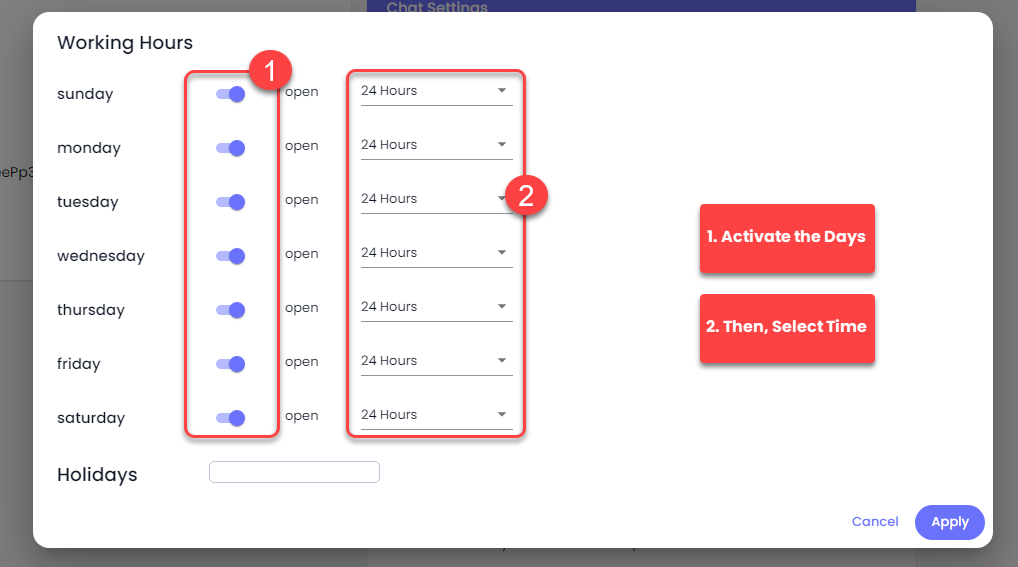
<figure><img src="https://files.gitbook.com/v0/b/gitbook-x-prod.appspot.com/o/spaces%2FhElFPtMZjXYjDDMBT5q2%2Fuploads%2FRqffg2LyOWeVxJAoytgl%2FActivating%20Working%20Days%20and%20TIme.png?alt=media&#x26;token=c8b253cf-c6cf-49bc-8fb4-917ed1b28fec" alt=""><figcaption></figcaption></figure>

Then, activate the days you work and mention the time.

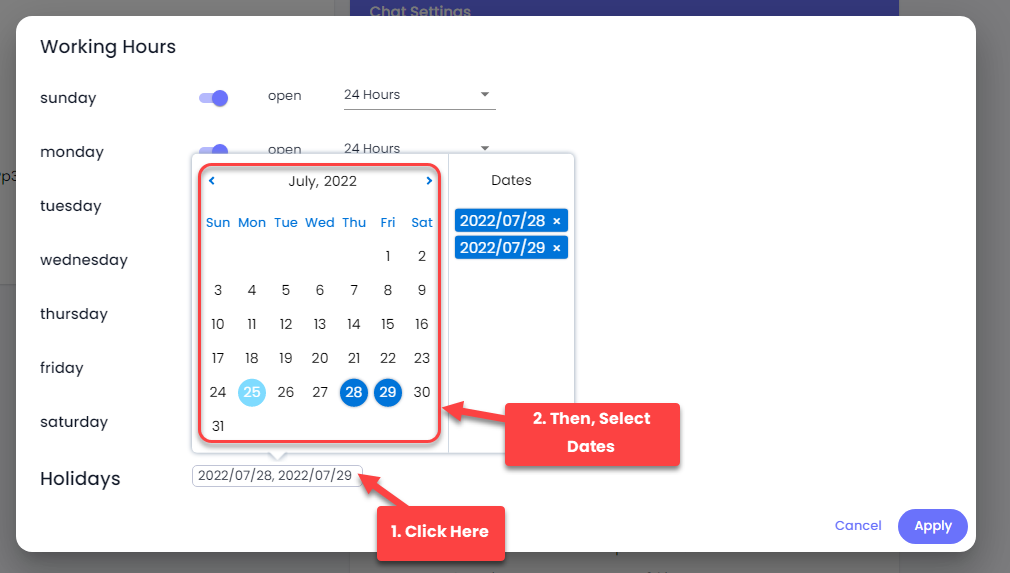
<figure><img src="https://files.gitbook.com/v0/b/gitbook-x-prod.appspot.com/o/spaces%2FhElFPtMZjXYjDDMBT5q2%2Fuploads%2FNczvnFjdZwCSN0WbBkHU%2FDeclaring%20Holidays.png?alt=media&#x26;token=8a433345-41fd-488a-8f84-8b0038d57f1e" alt=""><figcaption></figcaption></figure>

If you want to declare holidays, click the Holidays field and then select the dates.

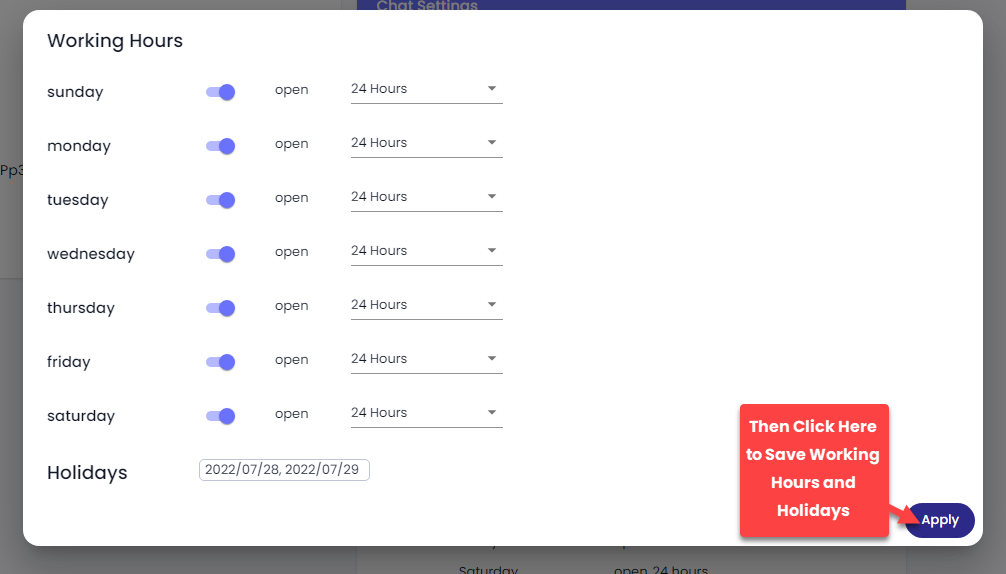
<figure><img src="https://files.gitbook.com/v0/b/gitbook-x-prod.appspot.com/o/spaces%2FhElFPtMZjXYjDDMBT5q2%2Fuploads%2FSP29t1G5XrSzi00dZagY%2FSaving%20Working%20Hours%20and%20Holidays.png?alt=media&#x26;token=970b550e-3ae7-4550-b90c-592c3264babd" alt=""><figcaption></figcaption></figure>

Once added Working Hours and Holidays, click **Apply**.