> For the complete documentation index, see [llms.txt](https://docs.rampwin.com/llms.txt). Markdown versions of documentation pages are available by appending `.md` to page URLs; this page is available as [Markdown](https://docs.rampwin.com/english/select-and-download-conversations.md).
# Select and Download Conversations
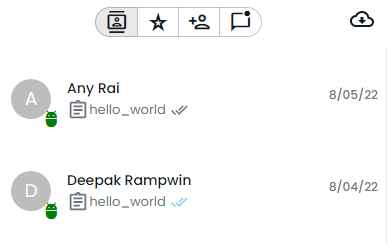
In the Conversation Tray, you can filter chats by their status and group. In addition, you can add contacts as well as download all the chats you had with your customers.
The filter options are,
* All Contacts: By default you see conversation of all the contacts.
* Starred Contact: View conversation of the contacts that you've pinned.
* Unread Contacts: View chats that you haven't read.
If you want to add a contact using chat, you can click the add contact button
And if you want to download the conversations, simply click the download button
 : By default you see conversation of all the contacts.
* Starred Contact
: By default you see conversation of all the contacts.
* Starred Contact : View conversation of the contacts that you've pinned.
* Unread Contacts
: View conversation of the contacts that you've pinned.
* Unread Contacts : View chats that you haven't read.
If you want to add a contact using chat, you can click the add contact button
: View chats that you haven't read.
If you want to add a contact using chat, you can click the add contact button And if you want to download the conversations, simply click the download button