> For the complete documentation index, see [llms.txt](https://docs.rampwin.com/llms.txt). Markdown versions of documentation pages are available by appending `.md` to page URLs; this page is available as [Markdown](https://docs.rampwin.com/english/file-manager.md).

# File Manager

<figure><img src="https://files.gitbook.com/v0/b/gitbook-x-prod.appspot.com/o/spaces%2FhElFPtMZjXYjDDMBT5q2%2Fuploads%2FcNy6bRmnQNuAukD1cFZv%2FAccessing%20File%20Manager.png?alt=media&#x26;token=094d28a6-e15d-4e9e-a3cf-85e7ceab0870" alt=""><figcaption></figcaption></figure>

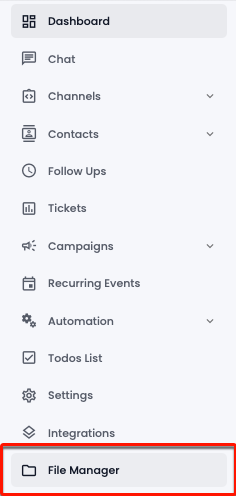
Go to the left sidebar and select **File Manager**.

<figure><img src="https://files.gitbook.com/v0/b/gitbook-x-prod.appspot.com/o/spaces%2FhElFPtMZjXYjDDMBT5q2%2Fuploads%2FSyAkVTBE7cwdGYNlpvLz%2FAccessing%20File%20Upload%20Option.png?alt=media&#x26;token=2350a5dc-8d55-43a3-88bc-44d75a04773a" alt=""><figcaption></figcaption></figure>

Then, click on the Plus Icon button to upload a file.

<figure><img src="https://files.gitbook.com/v0/b/gitbook-x-prod.appspot.com/o/spaces%2FhElFPtMZjXYjDDMBT5q2%2Fuploads%2FSXGrtnNIvKlBjAShju1X%2FUploading%20the%20File.png?alt=media&#x26;token=9530d352-74d7-478e-9dca-11d8fcb0c973" alt=""><figcaption></figcaption></figure>

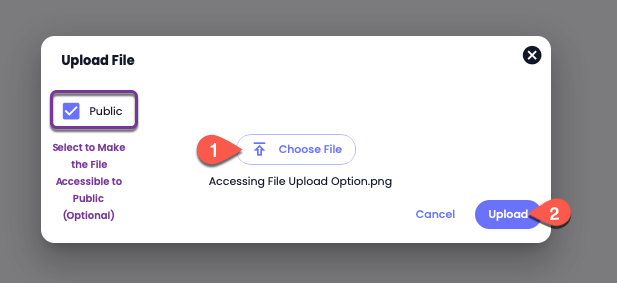
In the Upload File modal, click **Choose File** to browse the file on your system and select it. Then, if you want to make the file accessible to the public, click **Publish**. Once done, click **Upload**.

<figure><img src="https://files.gitbook.com/v0/b/gitbook-x-prod.appspot.com/o/spaces%2FhElFPtMZjXYjDDMBT5q2%2Fuploads%2FleJMcXRHoFHO0UNqQ1Ms%2FUploaded%20File.png?alt=media&#x26;token=d1377c05-ca16-49f6-9e28-47013cb673ec" alt=""><figcaption></figcaption></figure>

The uploaded file will appear like the above. Use *Search Files* to locate a file quickly. To delete a file, click on the Delete Icon button. And to download it, click on the Download Icon button.