# Department

### Overview

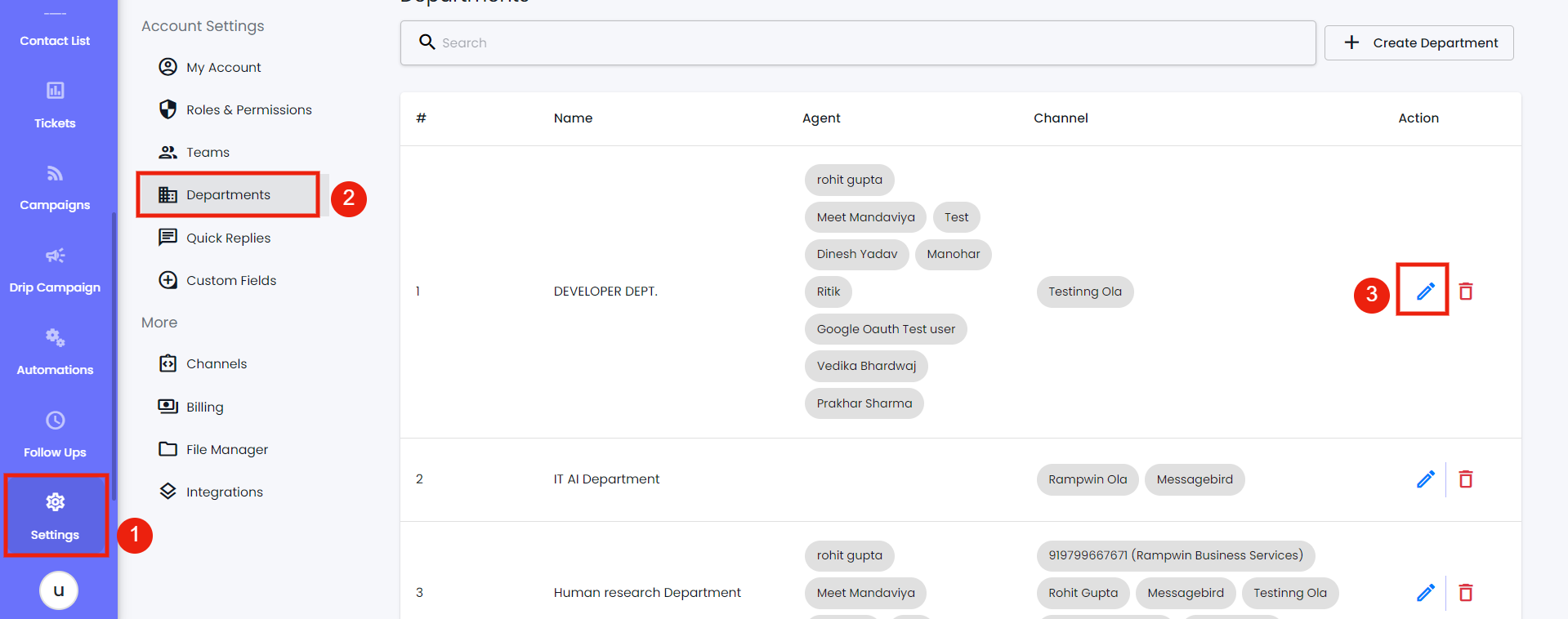
Using the Department setting, you can create new Departments; Edit and Delete them. Using a particular department, you can sort your [Team](https://docs.rampwin.com/english/broken-reference) members and provide them with access to manage specific channel(s).

To open the Department setting, go to **Settings** and then select the **Department** tab.

<figure><img src="https://290002001-files.gitbook.io/~/files/v0/b/gitbook-x-prod.appspot.com/o/spaces%2FURHq2UUVreYyIs2nEwlr%2Fuploads%2FhsjzeLvpOjiRbI86z6qt%2Fscreenshot-nimbusweb.me-2024.05.16-18_11_45.png?alt=media&#x26;token=cd9a864f-6445-45cc-b5e3-db5074e2fac4" alt=""><figcaption></figcaption></figure>

Create a Department&#x20;

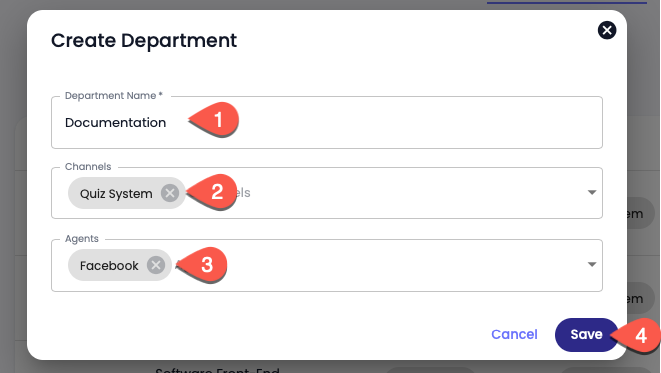
On the Department window, click **Create Department**.

<figure><img src="https://files.gitbook.com/v0/b/gitbook-x-prod.appspot.com/o/spaces%2FhElFPtMZjXYjDDMBT5q2%2Fuploads%2F1AovmsLtjf0DvsxTqbnH%2FCreate%20Department%20Modal.png?alt=media&#x26;token=45591e4d-b4f2-4be7-8a5b-1ba5cb37c6f5" alt=""><figcaption></figcaption></figure>

Then, input Department; select Channels and Agents( Team members) if any. Once done, click **Save**.

<figure><img src="https://290002001-files.gitbook.io/~/files/v0/b/gitbook-x-prod.appspot.com/o/spaces%2FURHq2UUVreYyIs2nEwlr%2Fuploads%2FwbL6pxgYmhGXr7iqn56K%2Fscreenshot-nimbusweb.me-2024.05.17-10_40_30.png?alt=media&#x26;token=9cfb22bd-aa49-46dd-833d-c44e94f9737e" alt=""><figcaption></figcaption></figure>

### Edit a Department&#x20;

<figure><img src="https://290002001-files.gitbook.io/~/files/v0/b/gitbook-x-prod.appspot.com/o/spaces%2FURHq2UUVreYyIs2nEwlr%2Fuploads%2F8zjmHcIH0xrXTkpMg2SD%2Fscreenshot-nimbusweb.me-2024.05.17-10_40_30.png?alt=media&#x26;token=e8c48837-bd8c-4aaa-bada-9043f36dc98b" alt=""><figcaption></figcaption></figure>

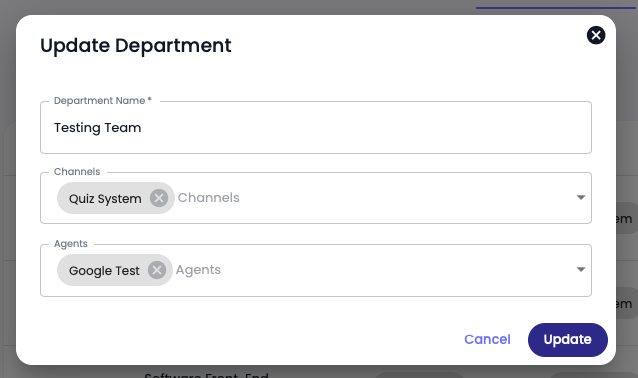
Open **Settings** → **Department** → and click on the Edit <img src="https://files.gitbook.com/v0/b/gitbook-x-prod.appspot.com/o/spaces%2FhElFPtMZjXYjDDMBT5q2%2Fuploads%2FtM0TpJ2uFQAN4Ck2pMsa%2FEdit%20Button%20Blue.png?alt=media&#x26;token=e5fd4863-2e0e-4e4c-9854-bca693646d06" alt="" data-size="line">icon.

<figure><img src="https://files.gitbook.com/v0/b/gitbook-x-prod.appspot.com/o/spaces%2FhElFPtMZjXYjDDMBT5q2%2Fuploads%2FeKIfWnaHFJ6UNV7xfks5%2FUpdate%20a%20Department.png?alt=media&#x26;token=95ec3eba-759e-489f-8cf9-5fa3a76050a7" alt=""><figcaption></figcaption></figure>

Then make appropriate changes and click **Update** to save changes.

### Delete a Department

<figure><img src="https://files.gitbook.com/v0/b/gitbook-x-prod.appspot.com/o/spaces%2FhElFPtMZjXYjDDMBT5q2%2Fuploads%2Fs2EXrtJAkx4nkNkLcBfq%2FDelete%20a%20Department.png?alt=media&#x26;token=b27ced84-5f91-4daf-b7a6-c644c24653ae" alt=""><figcaption></figcaption></figure>

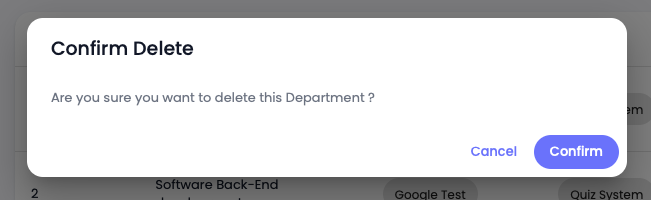
Click the Trash<img src="https://files.gitbook.com/v0/b/gitbook-x-prod.appspot.com/o/spaces%2FhElFPtMZjXYjDDMBT5q2%2Fuploads%2F3Of4IVOBkTD6Yfey20F7%2FDelete%20Button.png?alt=media&#x26;token=82c696d8-8f39-4ebd-82c3-f74f28e61d38" alt="" data-size="line">icon next to the edit button.

<figure><img src="https://files.gitbook.com/v0/b/gitbook-x-prod.appspot.com/o/spaces%2FhElFPtMZjXYjDDMBT5q2%2Fuploads%2FajY4DiZkEHrKhxqujLBR%2FConfirm%20Department%20Delete.png?alt=media&#x26;token=f21d054a-3a02-4507-954c-e4921f1d10ca" alt=""><figcaption></figcaption></figure>

Then click **Confirm** to finalize deleting.

### Download Team

<figure><img src="https://290002001-files.gitbook.io/~/files/v0/b/gitbook-x-prod.appspot.com/o/spaces%2FURHq2UUVreYyIs2nEwlr%2Fuploads%2F1Th73o5ODG3OeVYi7Lab%2Fscreenshot-nimbusweb.me-2024.05.17-10_45_20.png?alt=media&#x26;token=3906e3bc-0c03-4765-9770-fd561eca212b" alt=""><figcaption></figcaption></figure>

To download details of your Team member's account, click the **Download** button.&#x20;

### Edit a Team Member

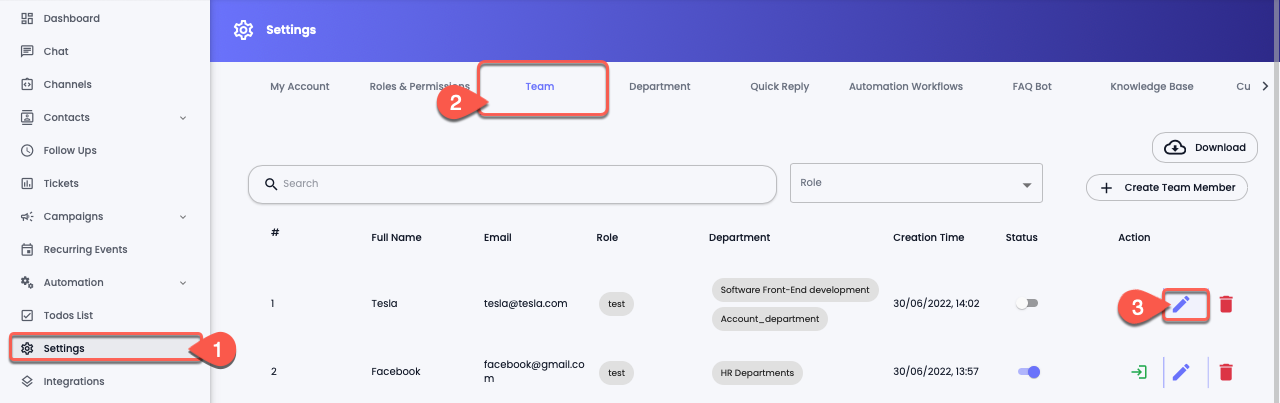
<figure><img src="https://files.gitbook.com/v0/b/gitbook-x-prod.appspot.com/o/spaces%2FhElFPtMZjXYjDDMBT5q2%2Fuploads%2FGyoxJzywbFsvo37fnDbF%2FEdit%20a%20Team%20Member.png?alt=media&#x26;token=25d83de1-6374-4fa6-8d81-dc46ac61f695" alt=""><figcaption></figcaption></figure>

Open **Settings** → **Team** → and click on the Edit <img src="https://files.gitbook.com/v0/b/gitbook-x-prod.appspot.com/o/spaces%2FhElFPtMZjXYjDDMBT5q2%2Fuploads%2FtM0TpJ2uFQAN4Ck2pMsa%2FEdit%20Button%20Blue.png?alt=media&#x26;token=e5fd4863-2e0e-4e4c-9854-bca693646d06" alt="" data-size="line">icon.

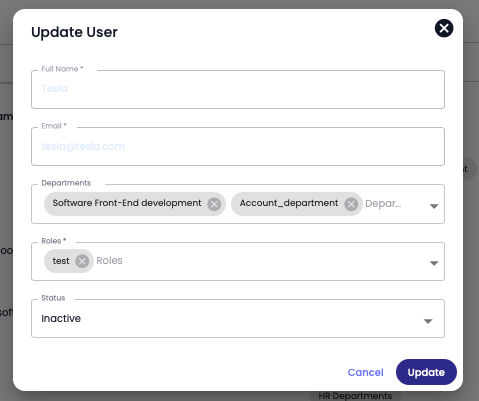
<figure><img src="https://files.gitbook.com/v0/b/gitbook-x-prod.appspot.com/o/spaces%2FhElFPtMZjXYjDDMBT5q2%2Fuploads%2Fl16eMiZ7ACS6oz4Y6I3d%2FUpdate%20a%20User.png?alt=media&#x26;token=e39afdf4-cfcd-4e02-8b13-b04d6362c215" alt=""><figcaption></figcaption></figure>

Then make appropriate changes to the Department, Roles and Status. Once edited, click **Update** to save changes.

### Delete a Team Member

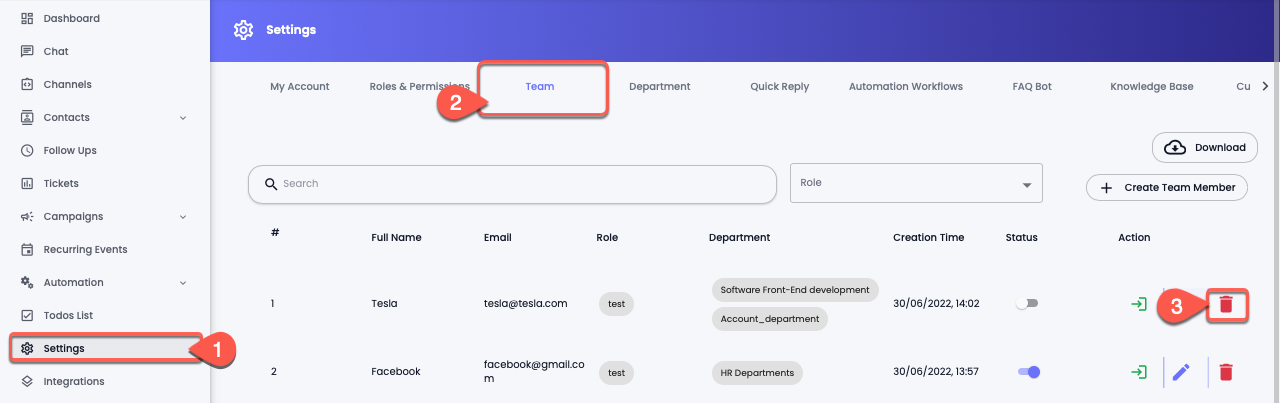
<figure><img src="https://files.gitbook.com/v0/b/gitbook-x-prod.appspot.com/o/spaces%2FhElFPtMZjXYjDDMBT5q2%2Fuploads%2FzDA8zTXiVsI7HugWoWZW%2FDelete%20a%20Team%20Member.png?alt=media&#x26;token=61772d2d-b6ec-4b29-a743-1ad29bd898f7" alt=""><figcaption></figcaption></figure>

Open **Settings** → **Team** → and click on the Trash icon<img src="https://files.gitbook.com/v0/b/gitbook-x-prod.appspot.com/o/spaces%2FhElFPtMZjXYjDDMBT5q2%2Fuploads%2F3Of4IVOBkTD6Yfey20F7%2FDelete%20Button.png?alt=media&#x26;token=82c696d8-8f39-4ebd-82c3-f74f28e61d38" alt="" data-size="line">

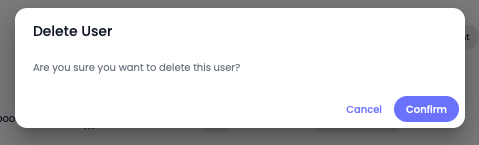
<figure><img src="https://files.gitbook.com/v0/b/gitbook-x-prod.appspot.com/o/spaces%2FhElFPtMZjXYjDDMBT5q2%2Fuploads%2FjSMHfAt2F4ii0t2Ld2L3%2FConfirm%20Team%20Member%20Delete.png?alt=media&#x26;token=bc38270b-64f4-4a8f-a945-238f9a75fa21" alt=""><figcaption></figcaption></figure>

### What's Next?

You've added your teammates, now you should know how you can respond to user messages. Let's explore that in the Chat module.