> For the complete documentation index, see [llms.txt](https://docs.rampwin.com/llms.txt). Markdown versions of documentation pages are available by appending `.md` to page URLs; this page is available as [Markdown](https://docs.rampwin.com/english/contact-list.md).
# Contact List
Create groups of contacts.
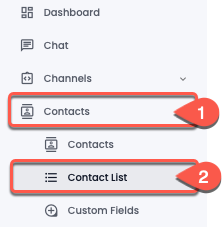
To create a group(s) of contacts/contact list, first, go to the **Contacts** → then select **Contact List**.
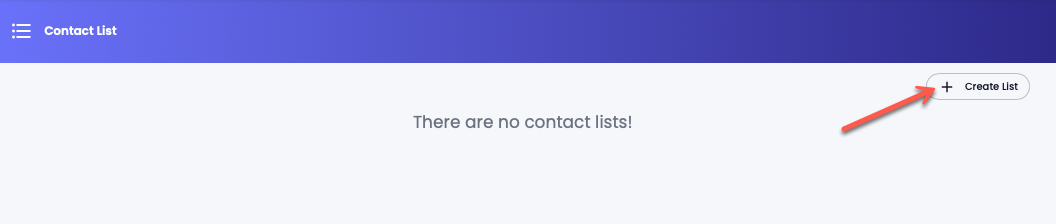
From there, click **Create List**.
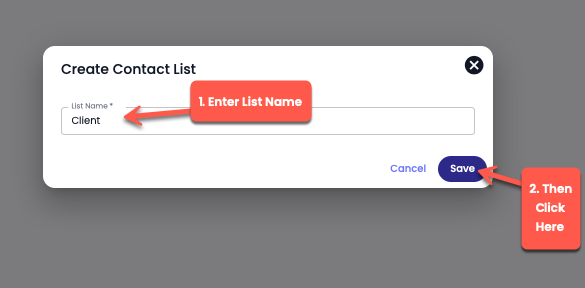
Enter List and click **Save**. Then through the [Contacts](broken://pages/Wlgg4DBG7Z4Shw5uchO7#add-to-list) module, add contacts to the list.
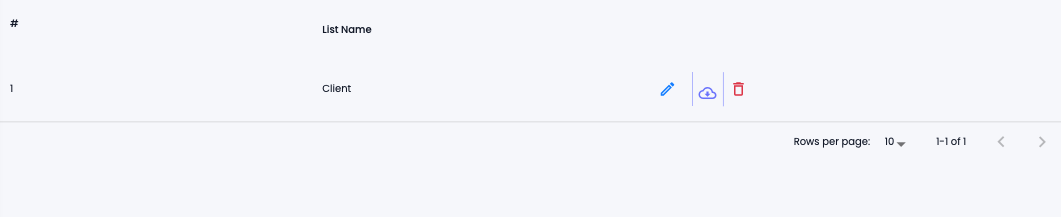
Use additional options such as,
* : to edit the list.
* : to export contacts added using the Contacts module.
* : delete the list.
 : to edit the list.
*
: to edit the list.
*  : to export contacts added using the Contacts module.
*
: to export contacts added using the Contacts module.
*  : delete the list.